Docu Reader - PDF Reader
- 3.8
- Rating
- 500.00K
- Installs
- Free
- Price
 Analysis by App-foxy
I came away from Docu Reader - PDF Reader with a fairly clear impression: it is a practical document tool that focuses on the everyday jobs most people actually need, rather than trying to become a complete office suite. I used it as a lightweight way to open PDFs, look through saved documents, turn images into PDF files, and keep basic document tasks in one place. That focused approach is its main appeal, but it also explains why some users may eventually want a more advanced alternative.
Developed by Simplibook, this free Tools app is aimed at anyone who wants a straightforward document reader on an Android device. Its short store label is “Docu Reader,” while its longer description points to PDF reading, image conversion, and document management. Those three areas describe the experience well: reading is the central task, image-to-PDF conversion is the useful extra, and file handling connects the two.
The app has reached over 500 thousand installs and holds a 3.8 average from around 600 ratings. That places it in the category of a familiar, reasonably established utility rather than an obscure experiment. It is rated for Everyone, works from Android 8.0 onward, and the current version is 1.2.2. I would not choose it because of those figures alone, but they do suggest that it is designed for broad, everyday use rather than a specialist audience.
You May Also Like

 Blood Strike: 2.5 Anniversary
Blood Strike’s Loadouts Turn Every Drop Into a Tactical Gamble
A close look at Blood Strike’s custom loadouts: how fast access to signature weapons reshapes its battle royale rhythm, rewards preparation, and narrows the gap between fights.

 Pandora - Music & Podcasts
Pandora’s Music Is Easy to Start, but Harder to Recover
Pandora’s strength is its low-effort path from a seed to a station. Its weak spot is how much confidence it asks you to place in connection, setup, and quiet recovery.

 8 Ball Pool
 Is Built on Rivalries, Rematches, and Routine
A close look at the rivalries, rematches, shared routines, and unanswered safety questions that turn a quick pool match into a persistent mobile community.

 Samsung Music
’s Quiet Strength Is Playing What You Already Own
Its reach comes less from spectacle than from dependable access to a personal library. That simplicity is both the app’s strongest retention engine and its ceiling.

 AccuWeather: Weather Radar
AccuWeather Review: A Quick, Clear Forecast for Everyday Decisions
For everyday plans, the best forecast is the one you can understand quickly. AccuWeather makes rain timing, radar, and local conditions easy to act on, with a few trade-offs.

 Hill Climb Racing
Why Hill Climb Racing Still Turns Crashes Into One More Run
A tiny car, a bumpy hill and one more upgrade: Hill Climb Racing keeps resurfacing because its simple chaos makes every near-miss feel personal.
More From Our News Desk



What using Docu Reader feels like in everyday work
I find it helpful to judge Docu Reader by the small tasks it can make less awkward, rather than by how many advanced tools a document app might offer. In everyday work, the useful question is whether it gives me a simple path from a file or a group of pictures to a readable, shareable document. That practical test also makes it easier to see when another kind of app would serve you better.
A sensible home for routine PDF reading
The strongest part of the app is its uncomplicated purpose. When I need to open a PDF on a phone, I do not necessarily want editing panels, cloud dashboards, collaboration tools, or a full document-production environment. I want the file to open, the pages to remain readable, and the controls to stay out of the way. Docu Reader fits that kind of moment.
This makes it useful for documents such as receipts, school handouts, instruction sheets, travel confirmations, menus, application forms, and downloaded manuals. A phone is often used as a temporary document desk: I receive a file, check a page, return to it later, and then move on. An app built around that rhythm can be more comfortable than a heavyweight office application.
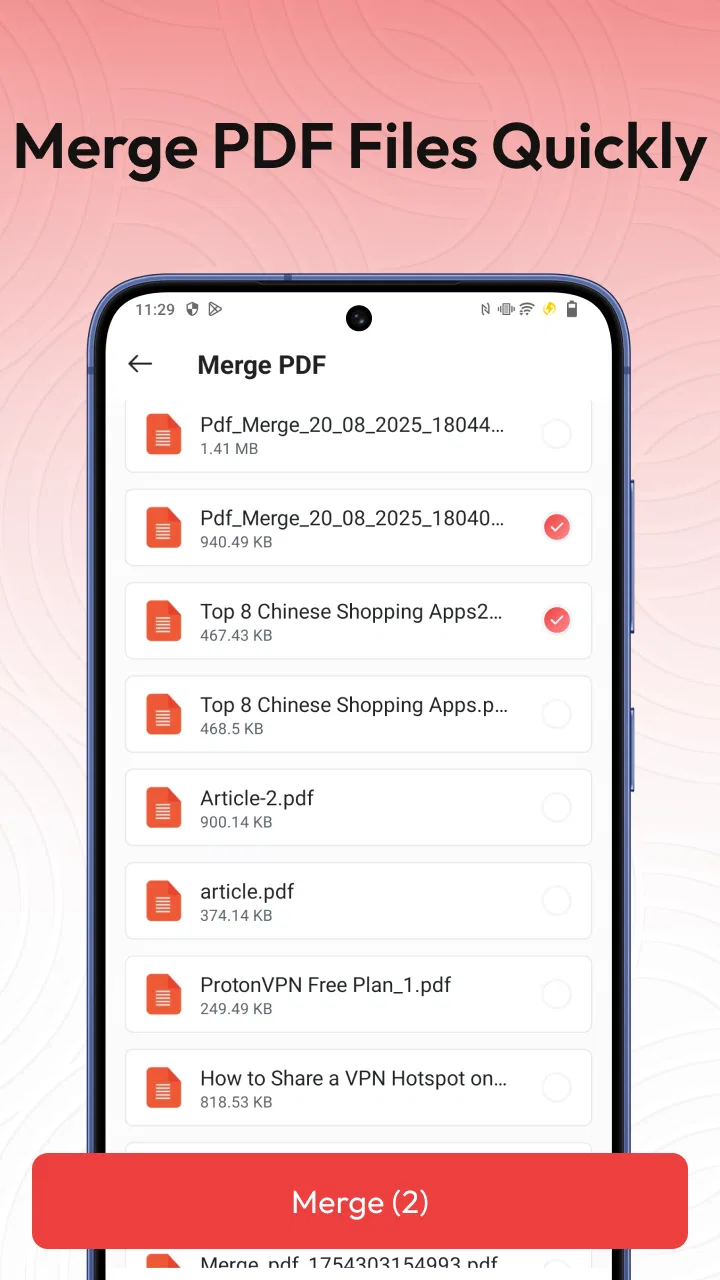
I also like the way the image-to-PDF function changes the app from a passive reader into a small capture tool. A PDF reader alone helps after a document already exists. Image conversion helps when the source is a photograph or a picture saved on the device. That distinction matters because many real documents begin as images: a photographed notice, a whiteboard, a handwritten page, or a screenshot that needs to be grouped into a shareable file.
A useful image-to-PDF workflow
The most practical way to use this feature is to prepare the images before converting them. I would first remove duplicate pictures, rotate anything sideways, and check that the important text is visible near the edges. Then I would select the pages in the order I want them to appear and create the PDF. This small preparation step avoids one of the most common frustrations with phone-generated documents: a file that technically works but is awkward to read because pages are out of order or poorly framed.
That workflow is especially helpful for a student collecting several pages of notes or for someone sending a group of photographed receipts. Instead of attaching separate image files, I can make one document that is easier to pass around and revisit. The benefit is not glamorous, but it is concrete: fewer files to sort through and a clearer result for the person receiving them.
There is also a useful trade-off here. Converting images into a PDF does not automatically make the words inside those images searchable or editable. The result can be a neatly packaged document while still behaving like a set of pictures. For ordinary viewing and sharing, that is fine. For extracting text, filling complex forms, or changing paragraphs, I would use a dedicated scanning or document-editing tool instead.
Where document management helps most
Document management sounds broad, but in this app I see its value in reducing small bits of phone clutter. If PDFs and converted files are scattered across downloads, messaging attachments, photo folders, and other app directories, finding the right one later becomes the real problem. A reader that gives documents a more focused place can save time even when the individual actions are simple.
My advice is to treat it as a working shelf, not as a complete archival system. Keep the documents you expect to open or share soon, and use clear file names when creating PDFs from images. Names such as “March receipts” or “biology notes” are much more useful than leaving a file with an automatically generated label. This is one of those small habits that makes a basic utility feel considerably more organized.
Another good habit is to check the finished PDF immediately after conversion. Open the first page, jump to the last page, and inspect the pages in between. This catches rotated images, accidental duplicates, and missing pictures before the file is sent to someone else. The app makes the conversion step convenient, but the user still needs to perform that quick quality check.
A realistic situation where it earns its place
Imagine receiving a request to send several signed pages from a paper document. I would photograph each page with the phone, review the images for shadows and cut-off edges, convert them into a single PDF, and then open the result to make sure the order is correct. For that situation, Docu Reader can replace a sequence of separate image attachments with one more manageable file.
The same approach works for a parent sending school paperwork, a renter keeping a copy of a signed inspection sheet, or a freelancer grouping photographed expense slips. None of these tasks requires a complex office suite. They require a reader, a way to package images, and enough organization to find the result afterward. That is where this app feels most convincing.
The friction I would not ignore
The app’s focus is also its main limitation. If your document work involves editing PDF text, adding sophisticated annotations, signing with specialized controls, comparing revisions, or collaborating with other people, this is unlikely to be the only tool you need. Its purpose is closer to viewing and basic document handling than to replacing a full professional PDF workspace.
I would also be careful about expecting image conversion to solve every scanning problem. A photograph taken in poor lighting, at an angle, or with a folded page can still produce an unpleasant document. The app can package the image, but it cannot make careless capture disappear. For important paperwork, I would spend more time taking clean, evenly framed pictures before relying on the conversion result.
There is a second kind of friction that appears with any focused reader: it may feel limited if you already depend on a broader ecosystem. People who live inside a cloud drive, use desktop PDF software daily, or need documents synchronized across several devices may prefer an app designed around that larger workflow. Docu Reader makes sense when the phone itself is the main place where the document is opened and prepared.
That does not make the app weak; it defines the boundary of its usefulness. I would rather see a small tool do its core jobs clearly than install a crowded application that makes simple reading feel like administrative work. But users should choose with that boundary in mind.
Who should install it
I would recommend Docu Reader to people who want a free Android utility for opening PDFs and occasionally turning images into a single document. It is a good fit for students, families, casual home users, and anyone who receives documents on a phone but does not need advanced editing every day. The Everyone age rating also suits a broad household audience.
It is particularly appealing if you often move between photos and PDFs. A person who only reads PDFs may find a dedicated reader sufficient, while someone who frequently photographs paperwork may appreciate having conversion and reading in one place. The value increases when the same phone is used for receiving, checking, creating, and revisiting documents.
I would skip it as a primary solution if your work depends on searchable scans, complex form completion, detailed markup, document signatures with strict requirements, or a carefully integrated multi-device office workflow. In those cases, a specialized PDF editor, scanner, or cloud-based document platform will usually be a better match. Installing Docu Reader alongside one of those tools could still make sense for quick viewing, but I would not mistake it for a professional replacement.
How it compares with familiar alternatives
Compared with a general file manager, Docu Reader has a clearer document purpose. A file manager may be better for browsing every type of file on the device, but it can make PDFs feel like just another item among images, downloads, and miscellaneous folders. Docu Reader is more suitable when the immediate task is reading or preparing documents.
Compared with a full office suite, it is less ambitious and potentially less distracting. Office apps are preferable when I need to create or edit substantial content, work with several formats, or connect documents to a wider productivity system. Docu Reader is the lighter choice for opening a PDF or assembling image pages without bringing an entire office environment into a small task.
Compared with a dedicated scanning application, its image-to-PDF function is convenient but should not automatically be treated as a complete scanning workflow. A scanner-focused app may offer more specialized capture assistance or recognition features, depending on the product. Docu Reader is better understood as a practical bridge between images and PDFs: useful for packaging pages, less suited to demanding document digitization.
That middle position is important. The app is not trying to win by offering every possible document feature. Its strongest argument is convenience for people whose needs sit between “just open this file” and “manage a professional document process.”
Small habits that improve the experience
I found three habits especially worthwhile. First, I would rename converted files immediately so they remain identifiable after they leave the app. Second, I would inspect page order and orientation before sharing. Third, I would keep the original images until I know the PDF is correct, especially when the pages contain information that would be difficult to recreate.
I would also avoid treating a converted PDF as proof that the content is editable. If I need to copy a paragraph, search for a name, or alter a number, I would check whether the source is text-based or image-based before planning the next step. This prevents wasted time and helps decide whether Docu Reader is enough or whether another tool should handle the document.
For occasional users, these habits are more important than learning a large set of controls. The app’s usefulness comes from a short workflow that is easy to repeat: locate a document, read it, create a PDF when needed, verify the result, and keep the finished file organized.
My final view of the app
After using it as a practical document companion, I see Docu Reader as a sensible choice for simple PDF work on Android. Its free price removes the main barrier to trying it, and the combination of reading, image conversion, and document handling gives it more everyday value than a reader that only opens existing files. The current version, 1.2.2, keeps the product positioned as a focused utility rather than a sprawling office platform.
My recommendation is specific: install it if you want a straightforward way to read PDFs and combine photographed or saved images into documents. Do not install it expecting advanced editing, professional scanning, or a complete replacement for desktop-grade PDF software. Its real strength is making small document jobs less scattered, not transforming the phone into a full publishing workstation.
For my own use, that is a worthwhile role. I would keep it available for quick document checks, simple image-to-PDF jobs, and everyday file organization. Users with modest needs should find that focused approach comfortable, while demanding document professionals should look toward a more specialized tool.
FAQs for Docu Reader - PDF Reader
01What is Docu Reader - PDF Reader used for?
Docu Reader - PDF Reader is designed for opening, reading, and managing PDF documents on a mobile device. After installing it, users can access saved files, browse pages, zoom in on text, and review documents without needing a computer. It can be useful for reading manuals, forms, study materials, receipts, tickets, and work-related PDFs while traveling or away from the office.
02Can Docu Reader - PDF Reader open PDFs from different sources?
In most cases, Docu Reader - PDF Reader can open PDF files stored on your phone as well as documents received through email, messaging apps, cloud storage, or a web browser, provided the sharing menu supports the application. The exact process may vary depending on your Android or iOS version. Before downloading, make sure your device has permission to access files and enough storage for the documents you plan to keep.
03Does Docu Reader - PDF Reader work offline?
A PDF reader generally allows documents already downloaded to the device to be opened without an internet connection, and Docu Reader - PDF Reader is suitable for offline reading of locally stored files. Internet access may still be required when downloading a document, opening an online link, synchronizing with a cloud service, or displaying advertising. Offline availability can therefore depend on where the PDF is saved.
04Can I edit, sign, or convert documents with Docu Reader - PDF Reader?
Docu Reader - PDF Reader is primarily intended for viewing and handling PDF files, so users should not automatically expect the full editing, electronic-signature, annotation, or file-conversion tools found in dedicated professional PDF suites. Some versions may offer basic document actions, but available features can differ by platform and subscription. Check the app listing and in-app options before relying on it for advanced document work.
05Is Docu Reader - PDF Reader free to download and safe to use?
The application may be available as a free download, although some features can be limited by advertisements, optional purchases, or premium plans. As with any document app, review the permissions requested during installation and avoid granting access that is unnecessary for your intended use. For sensitive PDFs, use a trusted device, keep the app updated, and confirm the developer and download source before installing.
Pros
- Opens PDFs quickly
- even when switching between several documents.
- Supports text search for finding specific words or passages.
- Bookmarks make it easy to return to important pages.
- Offers useful zoom controls for reading small text comfortably.
- Simple interface is suitable for users who want a focused PDF tool.
Cons
- Large or image-heavy PDFs may take longer to load.
- Advanced editing and annotation tools may be limited.
- Some features may require in-app purchases or premium access.
- The app may display advertisements in the free version.
- PDF rendering can vary with complex layouts or unusual fonts.

Docu Reader - PDF Reader
Gallery